 Łukasz Koszela, CEO at Flownally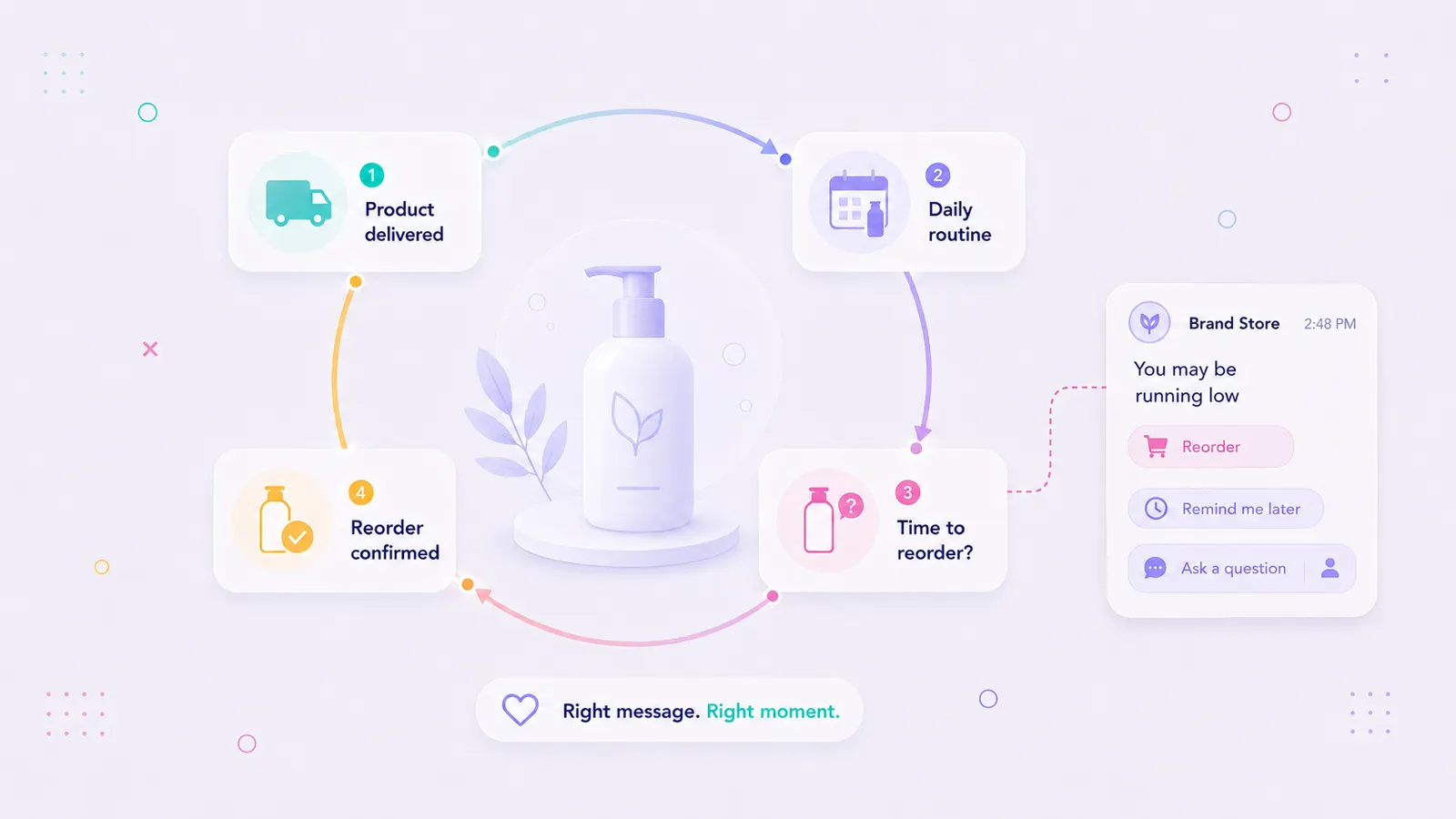
How Can Ecommerce Brands Automate Reorder Reminders for Consumable Products?
In this article · 11 sections
Ecommerce brands can automate reorder reminders by using purchase date, product size, and expected consumption cycle to trigger a message before the customer runs out.
This works best for consumable products with clear replenishment cycles, such as skincare, supplements, coffee, pet food, baby products, and personal care.
A good replenishment flow sends product guidance first, then a timely reorder reminder with options to reorder, delay, change the product, or ask a question.
Flownally helps ecommerce teams manage these flows across WhatsApp, Instagram, and Messenger in one shared inbox, with automation for predictable steps and human handoff when the customer needs help.
- Consumable products have a natural repeat purchase window because customers need to reorder before the product runs out.
- Automated reorder reminders help ecommerce brands turn product consumption cycles into repeat purchase journeys.
- The best replenishment flows are based on timing, customer context, product usage, and a clear path to reorder.
- Reorder reminders don't always need discounts. Good timing and convenience can be enough.
- Human handoff matters when the customer wants to change a product, adjust usage, ask a question, or pause the reorder.
- WhatsApp, Instagram, and Messenger can support reorder journeys when messages are expected, relevant, and permission-based.
- Flownally helps ecommerce teams automate replenishment flows, centralize conversations, and keep the team in control when customers need help.
- This article is the replenishment part of our repeat purchase cluster. It complements our broader guide on increasing repeat purchases in ecommerce and our jewelry brand repeat purchase example.
Why consumable products need a different repeat purchase journey
Some ecommerce products are bought once in a while; others run out. That difference matters.
If you sell skincare, supplements, coffee, pet food, baby products, cleaning products, or personal care, your customers already have a natural reason to come back.
The challenge is timing. A customer who bought a 30-day moisturizer two weeks ago doesn't need a refill yet. The one who bought the same moisturizer 28 days ago may need one soon.
If both customers receive the same campaign at the same time, the message will feel random to one of them. Because a good reorder reminder should arrive when the customer is likely to need the product again.
Shopify’s 2026 Ecommerce Growth Guide reports that customer acquisition costs are up between 6% and 12% year over year across ecommerce industries. It also highlights repeat purchase rate, retention, and CAC:LTV as important ecommerce growth metrics.
When acquiring customers gets more expensive, brands need to get more value from customers they already paid to acquire.
For consumable products, that starts with helping customers reorder at the right time.
What is an automated replenishment flow?
An automated replenishment flow is a messaging journey that reminds customers to reorder based on a product's expected lifecycle.
A simple replenishment journey can look like this:
Checkout → product guidance → reorder reminder → easy reorder or team handoff
It’s not about pushing another sale immediately after purchase. The goal is to help the customer use the product well, then remind them before they run out.
A good replenishment flow should answer four questions:
- How long does this product usually last?
- When should the customer receive product guidance?
- When should the reorder reminder be sent?
- What should happen if the customer wants to change, delay, or ask a question?
This is where messaging channels are useful.
A customer can reorder quickly, ask a question, change the product, or talk to a person when the choice isn’t obvious. That makes the flow helpful instead of pushy.
The 4-step automated reorder reminder framework
Step 1: Calculate the product consumption lifecycle
Start with the product.
Every consumable product has an expected usage duration.
For example:
- a 50 ml moisturizer used twice daily may last about 30 days,
- a 60-capsule supplement taken once daily may last 60 days,
- a 1 kg bag of coffee beans may last about 2–4 weeks,
- a bag of pet food may last longer or shorter depending on pet size.
Your replenishment flow should use the order date, product size, variant, and expected usage frequency to estimate the next reorder window.
The goal is to remind the customer they need your product before they run out.
Step 2: Send product guidance before asking for another order
Before you ask for another purchase, help the customer get value from the first one.
- For skincare, this might explain how often to use the product.
- For supplements, it might explain when to take them.
- For coffee, it might explain how to store the beans.
- For pet food, it might explain portioning or transition tips.
The first message shouldn’t be:
Buy again soon.
It should be:
Here’s how to get the best result from what you already bought.
A customer who builds a routine is more likely to reorder.
Step 3: Trigger a context-aware reorder reminder
When the replenishment window opens, send a direct reminder. The message should reference the product and the likely need.
For example:
Hi Sarah, you bought the Hydrating Cleanser about three weeks ago. Many customers reorder around this time. Would you like us to prepare your next bottle?
This works because it is specific:
- It’s based on what Sarah bought.
- It matches the product lifecycle.
- It gives her an easy next step.
WhatsApp Business State of Business Messaging reports that 72.4% of consumers are more likely to purchase from a brand that offers messaging. But the channel alone isn’t enough. The message still needs to be expected, useful, and timed well.
Step 4: Give customers control
Not every customer wants the same reorder.
A customer may want to reorder the same product, change flavor, choose a larger size, ask about a different product, delay the reminder, pause because they are traveling, or talk to the team.
That is why a good replenishment flow should offer simple quick replies:
- “Reorder”
- “Change product”
- “Remind me later”
- “Ask a question”
If the customer chooses “Ask a question” or writes a custom reply, the conversation should move to a team member.
In Flownally, the team can step in from the shared inbox with conversation history visible. That keeps the experience personal without making the team handle every predictable reminder manually.
When should ecommerce brands send reorder reminders?
The best time to send a reorder reminder is usually before the customer runs out, not after. A practical starting point is 3 to 7 days before the expected replenishment date.
| Product type | Typical replenishment cycle | When to send the reminder | Example reminder |
|---|---|---|---|
| Skincare cleanser | 30 days | Day 23–27 | “You may be running low on your cleanser. Want to reorder the same one?” |
| Supplement bottle | 60 days | Day 50–55 | “You’re approaching the end of your 60-day supply. Want to reorder before you run out?” |
| Coffee beans | 2–4 weeks | 3–5 days before expected runout | “Need another bag before your morning coffee runs low?” |
| Pet food | Depends on pet size and bag weight | 5–7 days before expected runout | “Is it time to reorder the same food for [Pet name]?” |
| Baby products | 2–6 weeks | 3–7 days before expected runout | “Want to restock before you run low?” |
The exact timing depends on product size, usage frequency, delivery time, customer habits, and whether the product is urgent or easy to replace.
If customers often tap “Remind me later,” the reminder may be too early. If they reorder only after a second message, the first reminder may be too soft or too late.
The goal is to be useful, not urgent.
Reorder reminder examples
Example 1: Skincare brand
A customer buys a 30-day cleanser.
Two days after delivery, the brand sends product guidance:
Hi Sarah, your Hydrating Cleanser has arrived. For best results, use 1–2 pumps every morning and evening on damp skin. Reply GUIDE if you want help building the full routine.
Around day 25, the brand sends the reorder reminder:
Hi Sarah, you’ve been using your Hydrating Cleanser for about three weeks. Many customers reorder around this time. Would you like us to prepare your next bottle?
- Reorder cleanser
- Change product
- Talk to team
If Sarah chooses “Reorder cleanser,” she gets a direct reorder path.
If she chooses “Change product,” the conversation can move to a team member who helps her choose the right alternative.
Example 2: Supplement brand
A customer buys a 60-day supply of Omega-3.
Around day 52, the brand sends:
Hi Alex, you’re approaching the end of your 60-day supply of Omega-3. Would you like to reorder the same bottle so you don't miss your daily routine?
- Reorder Omega-3
- Remind me in 5 days
- Ask a question
This works because it respects the customer’s timing. They can reorder, delay, or ask for help. That is very different from a generic discount campaign.
Should reorder reminders include discounts?
Not always. A reorder reminder already has value because it’s timely and useful. If the customer needs the product, convenience may be enough.
Discounts can help in some cases, especially for win-back or loyalty flows. However, they shouldn’t be the default.
If customers only reorder when there is a discount, margins can suffer. A stronger approach is to combine timing, convenience, and customer value.
Deloitte’s 2025 Consumer Loyalty Program Survey, published in 2026, found that easy redemption, meaningful personalization, and intuitive digital features help loyalty programs create stronger perceived value and measurable behavior change. The same research found that 40% of respondents sometimes forget to redeem rewards.
That is a useful lesson for reorder reminders:
Customers don't always need a bigger discount. Sometimes they need a clearer, easier moment to act.
What should brands measure?
A replenishment flow should be measured by more than clicks.
Useful metrics include:
- repeat purchase rate,
- reorder conversion rate,
- time to second purchase,
- Customer Lifetime Value,
- CAC payback,
- opt-out rate,
- “remind me later” rate,
- support handoff rate.
These metrics show whether the flow is helping customers reorder at the right time. They also show whether the messages feel useful. If opt-outs rise, the flow may be too frequent or too generic. If many customers ask for help, you may need better product guidance before the reorder message. And if reorder conversion improves without heavy discounting, the flow is doing its job.
Messaging channels and compliance matter
Reorder reminders work best when they are expected.
That is especially important on WhatsApp. Businesses should only send proactive messages when customers have opted in. The WhatsApp Business Messaging Policy says businesses are responsible for obtaining the required opt-in and that, outside the 24-hour customer service window, messages may only be sent through approved Message Templates.
That matters for replenishment flows. A reorder reminder shouldn’t feel like a random promotion. It should be permission-based, relevant, and clear.
Transparency also matters when automation is involved. Salesforce’s State of the AI Connected Customer reports that 72% of customers say it’s important to know if they are communicating with an AI agent. That doesn't mean every automated message needs a long explanation. It means automation should be clear, useful, and easy to leave. If the customer needs help, a person should be easy to reach.
How Flownally helps automate reorder reminders
Flownally helps ecommerce brands build repeat purchase journeys across WhatsApp, Instagram, and Messenger. For consumable products, that can mean automated replenishment flows based on product lifecycle, purchase history, and customer context.
Flownally helps teams:
- manage WhatsApp, Instagram, Messenger and SMS messages in one shared inbox,
- automate post-purchase product guidance,
- send context-aware reorder reminders,
- use quick replies such as “Reorder,” “Change product,” and “Remind me later,”
- route questions to a team member when automation is not enough,
- keep conversation history visible,
- support retention, reactivation, and replenishment journeys without creating more manual work.
Before building a replenishment flow, it helps to map the customer journey manually.
In a free messaging strategy review, the Flownally team can work with your product and order data to define:
- which products have clear reorder windows,
- which post-purchase messages should be automated,
- when to send the first reorder reminder,
- when to offer “remind me later” or “change product” options,
- when the conversation should move to a team member.
Once the journey is mapped, Flownally helps turn these moments into automated messaging flows across WhatsApp, Instagram, and Messenger.
Connecting the repeat purchase cluster
Building repeat purchase journeys depends on the type of product you sell.
For a broad framework, read our guide on how to increase repeat purchases in ecommerce.
For a high-consideration example, read our article on what an ecommerce repeat purchase system looks like for a jewelry brand. This article covers the replenishment side of the same system.
If your product runs out, your repeat purchase journey shouldn’t depend on the customer remembering to come back. It should help them reorder when the timing makes sense.
Ready to see which products in your store could become automated replenishment flows?
Flownally will help you identify reorder windows, missed repeat purchase opportunities, and messaging flows across WhatsApp, Instagram, and Messenger.



FAQ
An automated reorder reminder is a message sent to a customer before they are likely to run out of a product they already bought. It helps them reorder at the right time without relying on memory or generic campaigns.
A replenishment cycle is the expected time between when a customer buys a product and when they need to buy it again. For example, a 30-day moisturizer has a 30-day replenishment cycle. A 60-capsule supplement taken once daily has a 60-day replenishment cycle. A 1 kg bag of coffee beans may have a 2–4 week cycle depending on how much the customer drinks. Understanding your product's replenishment cycle is the foundation of automated reorder reminders. When you know the cycle, you can send reminders at the moment customers are most likely to need your product again.
An automated replenishment flow is a messaging journey based on a product’s expected usage cycle. It can include product guidance, reorder reminders, easy reorder options, and human handoff when the customer needs help.
Consumable categories benefit most. This includes skincare, cosmetics, supplements, coffee, tea, pet food, baby products, cleaning products, personal care, wellness products, and other items that customers use regularly and need to replace.
Ecommerce brands should usually send reorder reminders before the customer runs out, often 3 to 7 days before the expected replenishment date. The exact timing depends on product size, usage frequency, delivery time, and customer behavior.
Reorder reminders improve Customer Lifetime Value by helping customers buy again after the first order. When reminders are timely and useful, they can increase repeat purchase rate without requiring more acquisition spend.
A subscription automatically charges and ships products on a fixed schedule. A reorder reminder gives the customer more control. It reminds them when they may need the product again and lets them reorder, delay, change the product, or talk to the team.
Not always. Reorder reminders can work because they are timely and convenient. Discounts may help in some cases, but they should not be the default if the customer already needs the product.
Yes. Reorder reminders can complement subscription apps. They are useful for customers who don't want an automatic subscription but still want an easy way to reorder when they are ready.
Brands should track repeat purchase rate, reorder conversion rate, time to second purchase, Customer Lifetime Value, CAC payback, opt-out rate, “remind me later” rate, and support handoff rate.
They can be compliant if the customer has opted in and the business follows WhatsApp rules. Outbound messages outside the customer service window should use approved Message Templates where required.
The flow should make it easy to change the product, delay the reminder, or ask a question. If the request is specific, the conversation should move to a team member with the customer’s context visible.
Flownally helps ecommerce brands automate reorder reminders across WhatsApp, Instagram, and Messenger. It centralizes conversations in one shared inbox, keeps customer context visible, and lets the team step in when automation is not enough.
No. Flownally is not only a chatbot. It helps ecommerce teams manage messaging channels, automate customer journeys, keep conversation history visible, and hand off conversations to a person when needed.