One shared inbox
Manage WhatsApp, Messenger, Instagram, and SMS conversations in one workspace.
One conversation. Every next step connected.
Bring messages, customer context, automation, human support, follow-ups, and campaigns into one connected system — from the first question to the next purchase.
No credit card needed. Full access from day one.
Marc
Which coffee beans would work best with a Sage Barista Pro?
Manage WhatsApp, Messenger, Instagram, and SMS conversations in one workspace.
See customer information, chatbot activity, automated messages, and team replies together.
Move between automation, human support, and follow-up without losing the thread.
Find the feature you need or explore how everything works together.
Manage WhatsApp, Messenger, Instagram, and SMS conversations in one inbox, with customer, chatbot, automation, and team messages visible in the same thread.
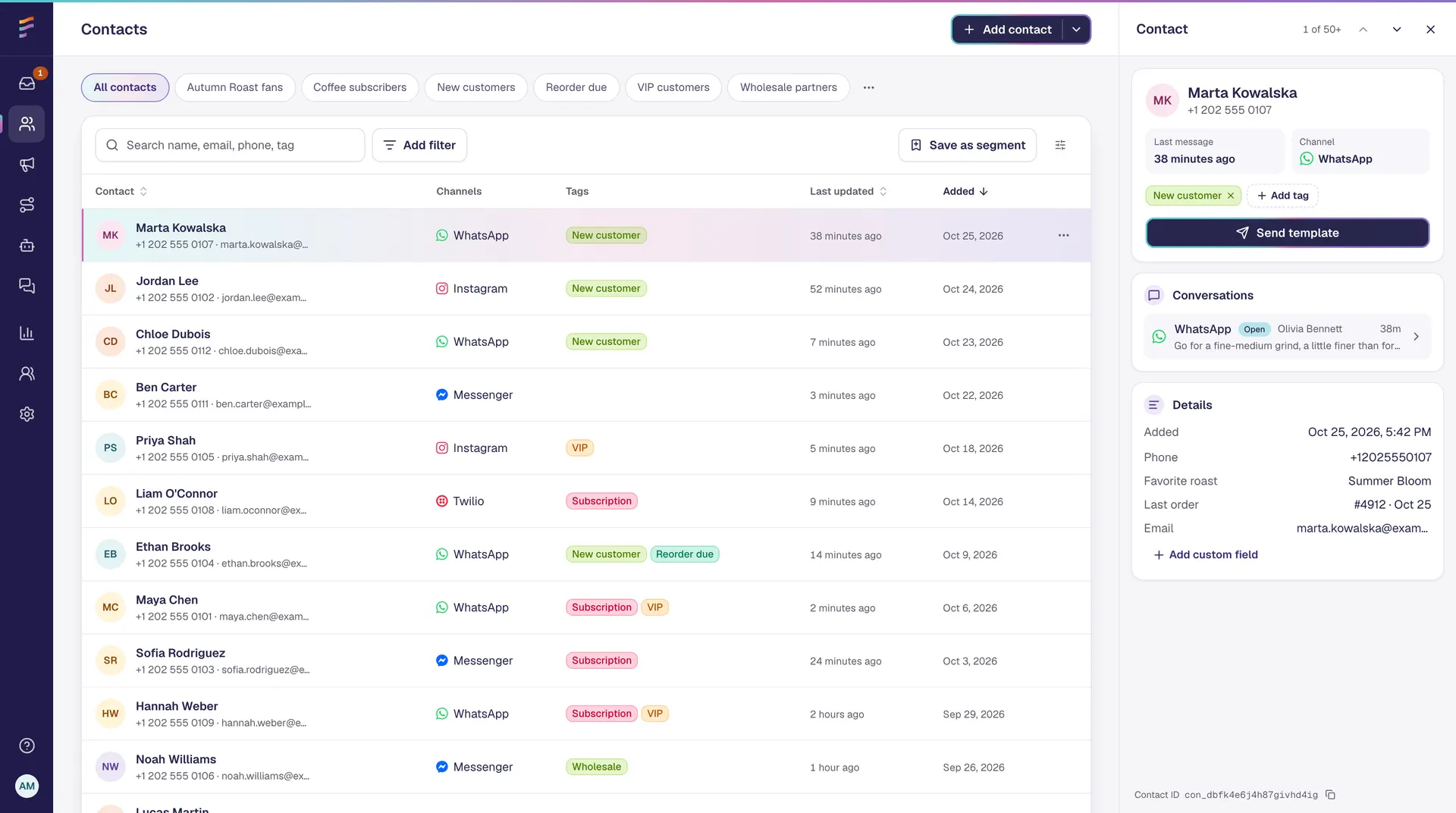
Import, search, filter, tag, and organize contacts with custom fields and conversation history.
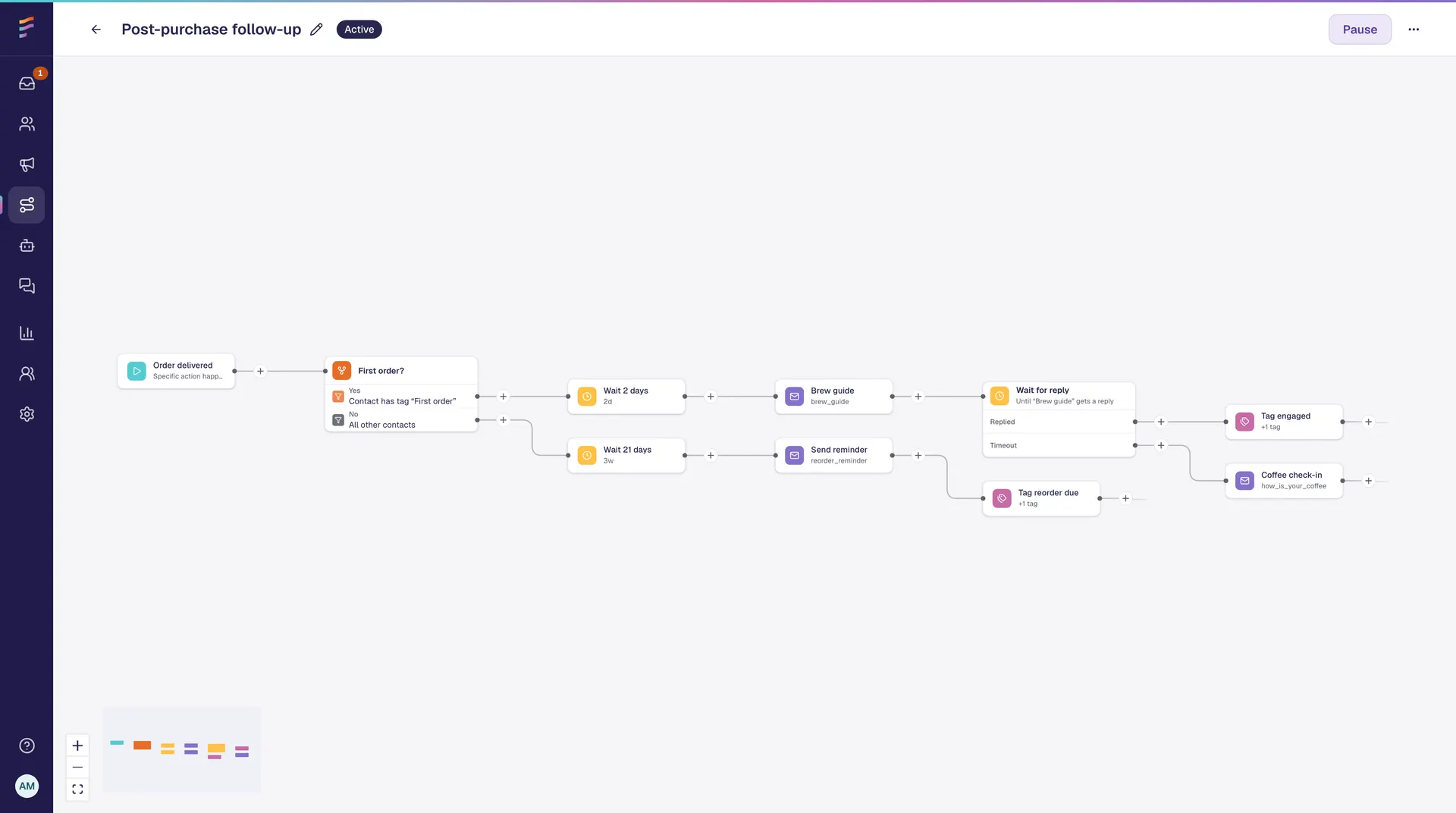
Create no-code journeys with triggers, messages, waits, follow-ups, conditions, and events.
Set up common customer communication scenarios without building from scratch.
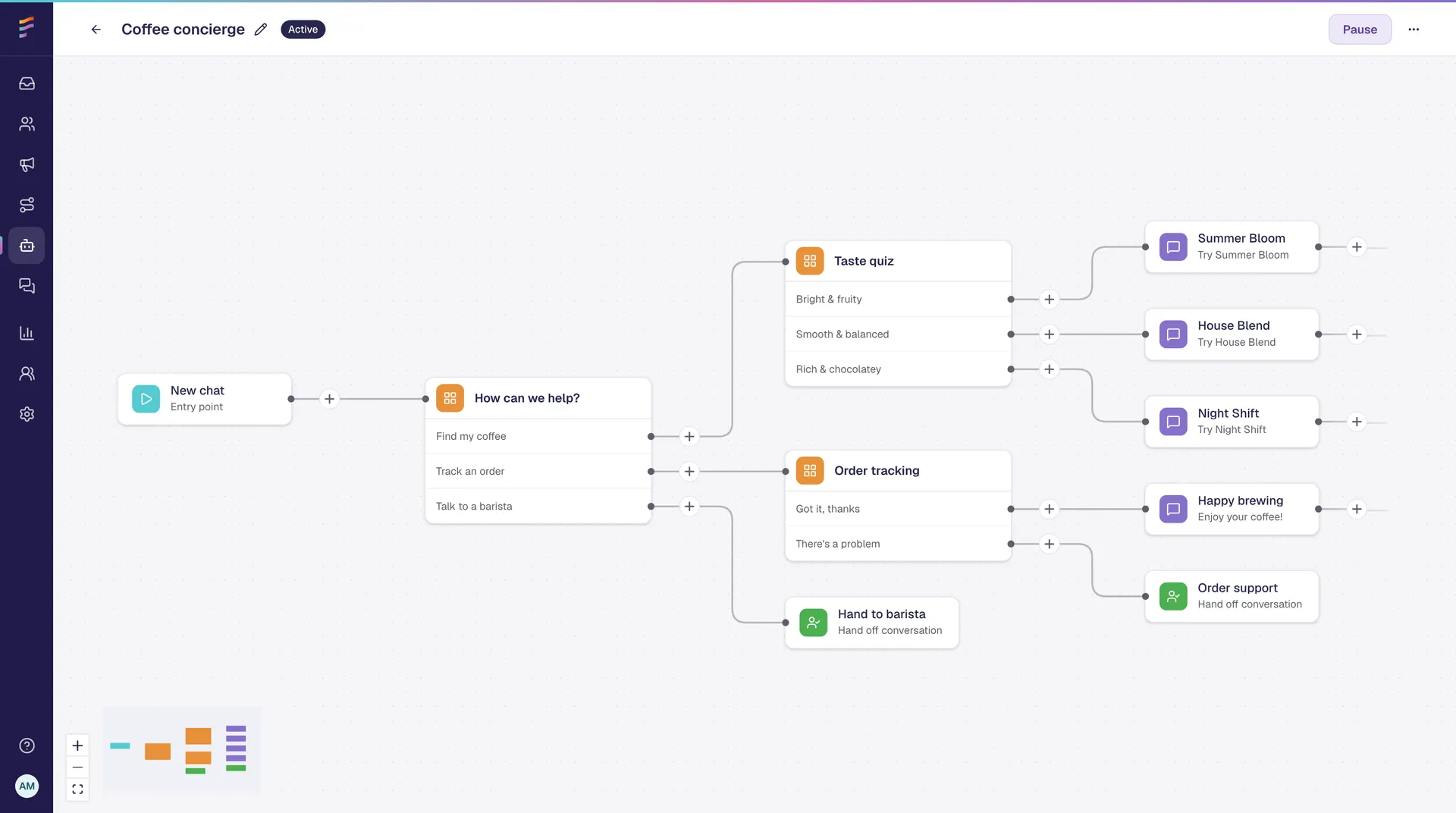
Build interactive conversations with quick replies, rich messages, conditions, and intent detection.
Route conversations to the right team and continue with the full history visible.
Reach the right customers with timely campaigns and follow-ups based on their data, activity, and journey stage.
Connect customer communication with your other tools, events, and systems.
Understand how conversations, automations, campaigns, and teams are performing.
Follow one WhatsApp conversation from the first product question to a relevant reorder reminder. Each step builds on the same conversation history and customer context.
Marc
Marc
Which coffee beans would work best with a Sage Barista Pro?
Marc
Marc
Which coffee beans would work best with a Sage Barista Pro?
01 · Shared Team Inbox
Marc is interested in buying, but he needs help choosing the right product. His WhatsApp message appears in the shared inbox together with the customer information available to the team.
Marc
Marc
Which coffee beans would work best with a Sage Barista Pro?
Best Coffee Roastery chatbot
What type of coffee do you usually make?
02 · No-code Chatbot Builder
Instead of showing Marc every available coffee, the chatbot starts with one simple question. Quick replies make it easy to provide the information needed for a more relevant recommendation.
Marc
Marc
Which coffee beans would work best with a Sage Barista Pro?
Best Coffee Roastery chatbot
What type of coffee do you usually make?
Marc
Milk-based drinks
Best Coffee Roastery chatbot
Which milk-based coffee do you usually make?
Marc
Flat white
03 · Conditional Logic and Routing
Marc’s first choice opens a more specific set of options. When he selects flat white, Flownally saves the context and routes the conversation to the team that handles milk-based coffee recommendations.
Marc
Marc
Which coffee beans would work best with a Sage Barista Pro?
Best Coffee Roastery chatbot
What type of coffee do you usually make?
Marc
Milk-based drinks
Best Coffee Roastery chatbot
Which milk-based coffee do you usually make?
Marc
Flat white
Alex · Coffee Advisor
For flat whites made with a Sage Barista Pro, I’d recommend our Brazil House Blend. It has enough body to cut through the milk while keeping the cup smooth and balanced.
You can find it here:
bestcoffeeroastery.example/brazil-house-blendMarc
Thanks!
04 · Human Handoff
Alex already knows which machine Marc uses and that he prefers flat whites. There is no need to repeat the same questions. The advisor can move directly to a specific recommendation and share a product link.
Marc
Marc
Which coffee beans would work best with a Sage Barista Pro?
Best Coffee Roastery chatbot
What type of coffee do you usually make?
Marc
Milk-based drinks
Best Coffee Roastery chatbot
Which milk-based coffee do you usually make?
Marc
Flat white
Alex · Coffee Advisor
For flat whites made with a Sage Barista Pro, I’d recommend our Brazil House Blend. It has enough body to cut through the milk while keeping the cup smooth and balanced.
You can find it here:
bestcoffeeroastery.example/brazil-house-blendMarc
Thanks!
Best Coffee Roastery
Your Brazil House Blend order is confirmed. When it arrives, start with a 1:2 coffee-to-water ratio. We’ll also send you a short guide to help you adjust the grind.
05 · Visual Journey Builder
When Marc completes the order, the order_created event reaches Flownally. His customer profile is updated, and the appropriate post-purchase journey starts automatically. The confirmation and useful product guidance appear in the same conversation thread.
Marc
Marc
Which coffee beans would work best with a Sage Barista Pro?
Best Coffee Roastery chatbot
What type of coffee do you usually make?
Marc
Milk-based drinks
Best Coffee Roastery chatbot
Which milk-based coffee do you usually make?
Marc
Flat white
Alex · Coffee Advisor
For flat whites made with a Sage Barista Pro, I’d recommend our Brazil House Blend. It has enough body to cut through the milk while keeping the cup smooth and balanced.
You can find it here:
bestcoffeeroastery.example/brazil-house-blendMarc
Thanks!
Best Coffee Roastery
Your Brazil House Blend order is confirmed. When it arrives, start with a 1:2 coffee-to-water ratio. We’ll also send you a short guide to help you adjust the grind.
Best Coffee Roastery
Running low on Brazil House Blend?
Reorder the same coffee or see similar coffees for milk-based drinks.
Marc
Reorder the same.
One conversation. Every next step connected.
06 · Campaigns and Follow-ups
Marc receives a replenishment message when he may genuinely be ready to reorder. The recommendation reflects the product he bought and the preferences collected earlier in the conversation.
When he replies, the message returns to the same WhatsApp inbox and can continue with automation or a team member.
From product question to repeat purchase - without losing the context between steps.
The inbox, chatbot, customer profile, routing, journeys, and campaigns work around the same conversation. Automation handles repeatable steps, while the team joins when individual advice can move the customer closer to a decision.
See how Flownally could work for your customer journey
Shared Team Inbox
Bring WhatsApp, Messenger, Instagram, and SMS into one shared inbox. Your team can respond without switching apps, losing context, or wondering what has already been sent.
Included features
Shared inbox · Conversation history · Media · Reactions · SMS · WhatsApp templates
What you can do:
Automation and human replies stay visible in the same conversation.
Mark
Mark
Best Coffee Roastery chatbot
Alex · Coffee Advisor
Customer Profiles | Contact Management
Every conversation is connected to a customer profile. Your team sees who the customer is, what happened before, and which information may be relevant to the next reply.
Included features
Contact import · Tags · Custom fields · Channels · Activity · Conversation history
What you can do:
Your team starts with context, not an empty message window.
Visual Journey Builder | Quick Automations | Conditional Logic
Build customer journeys without code. Decide what starts the journey, which message is sent, how long Flownally should wait, and what should happen based on customer data or activity.
Included features
Triggers · Follow-ups · Conditions · Tags · Events · HTTP requests
What you can do:
Common use cases
Unfinished conversation follow-ups · Post-purchase guidance · Reorder reminders
Build the process once. Let Flownally keep it moving.
No-code Chatbot Builder · Intent Detection · Human Handoff
Create chatbots that answer common questions, collect information, understand intent, and guide customers to the right next step. When the conversation needs personal attention, your team can take over with the full context intact.
Included features
Rich messages · Quick replies · Conditions · Intent detection · Tags · Handoff
What you can do:
Automation handles the structure. Your team keeps control.
Human Handoff · Automatic Routing · Team Management
Transfer a conversation to the relevant team when the customer needs individual help. Previous chatbot messages, collected answers, and contact details remain visible, so the team can continue without asking the customer to start again.
Included features
Teams · Roles · Routing · Handoff · Shared context
What you can do:
The customer keeps moving. Your team knows when to join.
Mark
Best Coffee Roastery chatbot
Which milk-based coffee do you usually make?
Mark
Alex · Coffee Advisor
Campaigns · Segmentation · Follow-ups
Use customer context to send relevant, permission-based messages throughout the relationship. Reach the right customers based on their tags, profile information, previous conversations, and position in the journey.
Included features
Audiences · Segmentation · Templates · Scheduling · Replies · Reporting
What you can do:
Common use cases
Post-purchase campaigns · Replenishment reminders · Review requests · Product recommendations · Reactivation campaigns
The goal is not to send more messages. It is to send the right message when it can help the customer move forward.
Audience
Flat white customers
Message preview
Running low on Brazil House Blend?
Reorder the same coffee or see similar coffees for milk-based drinks.
Reorder the same
See similar coffees
Results / replies
Reorder the same.
API Access · HTTP Requests · Custom Events · Website Widgets
Flownally can exchange information with the tools and systems your business already uses. Trigger actions, update customer data, and connect communication to events happening outside the inbox.
Included features
API · Events · Webhooks · HTTP requests · Widgets
What you can do:
Customer communication stays connected to what is happening elsewhere in your business.
Ecommerce platform
order_created
Flownally journey
First coffee order
WhatsApp confirmation
Order confirmed
HTTP request / profile update
First-time customer
Reporting · Journey Performance · Campaign Analytics
Understand how conversations, journeys, campaigns, and team activity are performing. Use the data to improve response speed, follow-up, automation, and customer experience.
Included features
Conversations · Journeys · Campaigns · Channels · Team activity
What you can do:
Improve the journey based on what customers actually do.
Conversations by channel
Last 30 days
Journey completion
42%
Campaign engagement
Team activity
18
Open
42
Assigned
96
Resolved
FAQ
Find quick answers about Flownally’s channels, inbox, automation, chatbots, integrations, and free trial.
Start with one channel and one journey. See how Flownally helps your team manage messages, automate follow-up, and stay connected to customers over time.
No credit card needed. Full access from day one.