 Aleksandra Koszela, Product & CX Strategist at Flownally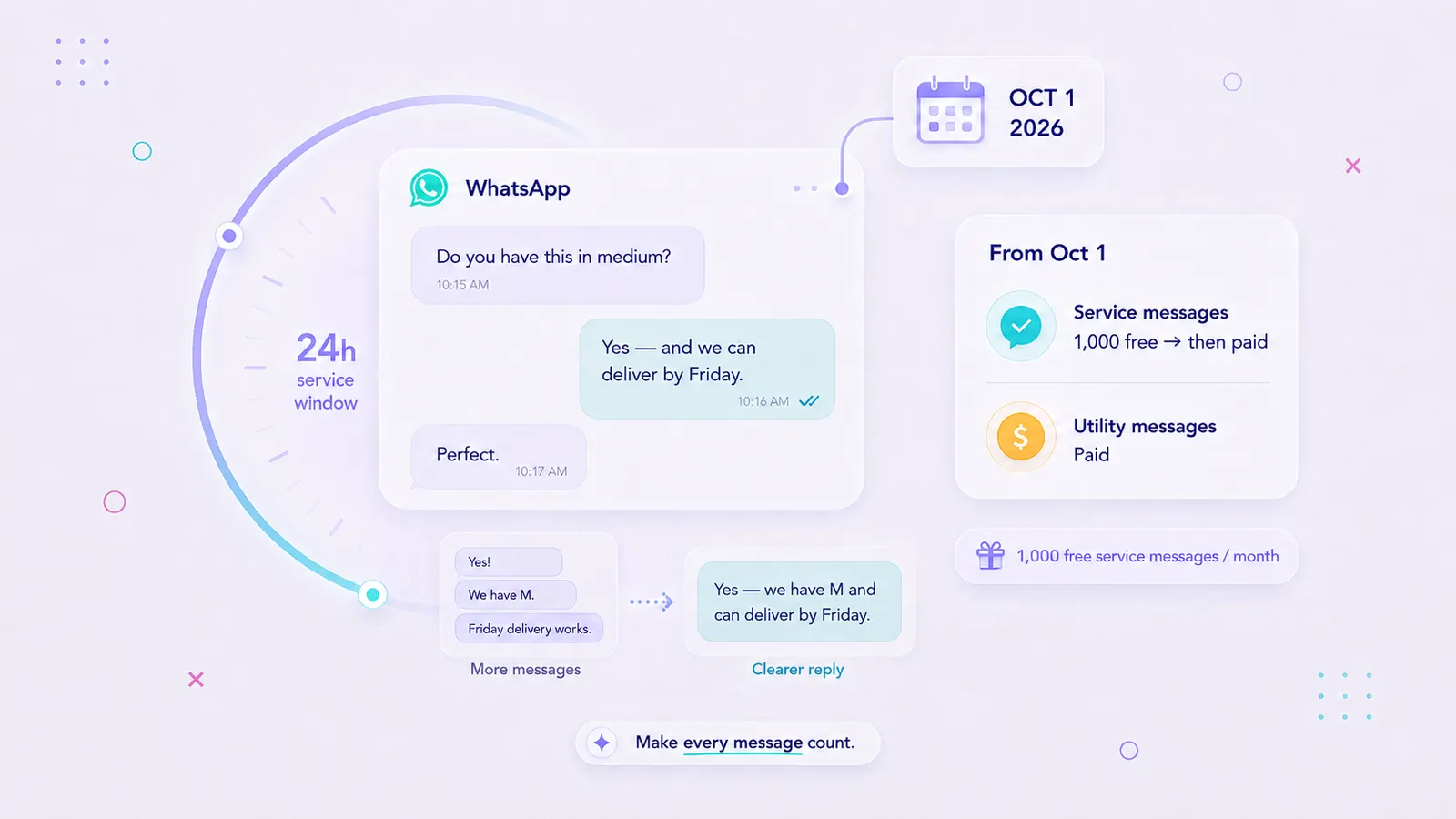
WhatsApp Pricing Changes on October 1, 2026: What Ecommerce Teams Should Change
In this article · 9 sections
From October 1, 2026, Meta will start charging for two message types that are currently free inside the WhatsApp 24-hour customer service window: service messages and utility template messages.
Each business phone number will still receive 1,000 free service messages per month. After that allowance, delivered service messages become billable at the applicable market rate. Utility template messages sent inside the 24-hour window become billable from the first delivered message.
The 24-hour customer service window remains in place. It still determines when businesses can send free-form service messages.
For ecommerce teams, the change makes message volume, automation design, and support efficiency more important cost factors.
Before October 1:
- calculate your expected WhatsApp costs,
- review your highest-volume customer journeys,
- check how many service messages your team actually sends,
- audit utility notifications,
- and remove messages that add little value for the customer.
Flownally helps ecommerce teams manage WhatsApp automation, customer replies, and human handoff in one shared workspace, making it easier to see where messages add value and where flows can be simplified.
Calculate your October WhatsApp costs with the Flownally WhatsApp Business API Pricing Calculator 2026.
- Service messages become billable. From October 1, Meta will charge per delivered service message after the monthly free allowance is used.
- Every business phone number gets 1,000 free service messages per month. The allowance resets monthly, and unused messages don’t roll over.
- Utility templates inside the 24-hour window become billable. They are currently free when sent during an open customer service window.
- Incoming customer messages remain free.
- The 24-hour customer service window remains. Businesses can still send free-form messages only while that window is open.
- Free entry point conversations remain available. Eligible conversations started through Click-to-WhatsApp ads or Facebook Page call-to-action buttons can still open a 72-hour free entry point window.
- Ecommerce teams should audit message value, not simply message volume. Start with fragmented replies, overlapping automations, unnecessary utility updates, and high-message journeys.
- Use your own message counts. Recipient market, category, free allowance, and delivered message volume determine the real impact.
- Keep the journey connected. Flownally brings WhatsApp automation, customer replies, conversation history, and human handoff into one shared workspace.
What exactly changes on October 1, 2026?
WhatsApp Business Platform already uses per-message pricing for marketing, authentication, and most utility template messages. On October 1, Meta expands per-message charging further into the 24-hour customer service window.
Service messages
A service message is a non-template message sent by a business while the 24-hour customer service window is open.
It could be:
- an agent answering a product question,
- a support reply,
- a bot response,
- a delivery clarification,
- or another free-form message sent after the customer has contacted the business.
Until September 30, these messages are free from Meta messaging charges. From October 1, each business phone number receives 1,000 free service messages per month. Meta charges delivered service messages after that allowance is used.
Utility template messages
Utility templates support an existing transaction or customer relationship.
Common ecommerce examples include:
- order confirmations,
- payment updates,
- shipping notifications,
- delivery updates,
- account information,
- and other transactional messages.
Utility templates sent inside an open 24-hour customer service window are currently free.
From October 1, they become billable per delivered message.
| Message type | Through Sep 30, 2026 | From Oct 1, 2026 |
|---|---|---|
| Incoming customer messages | Free | Free |
| Service messages inside 24h | Free | First 1,000/month per business phone number free, then paid |
| Utility templates inside 24h | Free | Paid |
| Utility templates outside 24h | Paid | Paid |
| Marketing templates | Paid | Paid |
| Authentication templates | Paid | Paid |
Eligible 72-hour free entry point conversations remain available for customers who start a conversation through qualifying Click-to-WhatsApp ads or Facebook Page call-to-action buttons.
The October pricing change applies to the WhatsApp Business Platform/API. Businesses using only the regular WhatsApp Business App aren't subject to these API per-message charges.
Source: Meta WhatsApp Business Platform pricing documentation. Last checked September 7, 2026.
To see how the new model affects your own message volume and recipient markets, use the WhatsApp Business API Pricing Calculator 2026.
Why ecommerce teams should care about service-message pricing
For many ecommerce businesses, the biggest new cost may come from everyday customer conversations.
A customer asks:
Do you have this dress in medium?
Your team replies.
Another customer asks:
Where is my order?
An automation sends the status.
Someone else asks:
Can I change my delivery address?
An advisor continues the conversation.
These interactions can generate several outbound service messages.
Ecommerce teams often handle:
- product questions,
- sizing advice,
- stock checks,
- delivery questions,
- return requests,
- order changes,
- payment questions,
- post-purchase support,
- and purchase follow-ups.
Until September 30, teams can exchange free-form business replies inside the 24-hour window without Meta charging for each message.
From October, message structure starts affecting cost once the 1,000-message free allowance has been used.
Utility automation also deserves attention.
A single order may currently generate:
[Order confirmed] → [Payment received] → [Preparing order] → [Shipped] → [Out for delivery] → [Delivered]
Every update may be valid operationally. The customer may need fewer WhatsApp notifications. That’s where an audit should start.
First, calculate your actual exposure
Avoid redesigning every WhatsApp flow before you know how much the change affects your business.
Check:
- monthly service-message volume,
- how many business phone numbers you use,
- how much of the 1,000-message allowance each number uses,
- utility template volume,
- utility templates currently sent inside active customer service windows,
- recipient countries,
- and the journeys that generate the highest number of outbound messages.
A business phone number sending fewer than 1,000 service messages each month may see little direct impact from the new service-message charge. Utility templates inside the customer service window can still add new costs. Higher-volume support teams may see a much larger difference.
The Flownally WhatsApp Business API Pricing Calculator 2026 lets you enter delivered message counts by category and recipient market and compare your current and October costs.
How many WhatsApp service messages do you really need?
There is no universal target.
A high-value sales conversation may need several messages and still generate excellent ROI. A basic stock question may need one complete answer.
A more useful question is:
How many paid outbound messages does it take to achieve the customer outcome?
Consider this exchange.
Before
Do you have the green jacket in M, and can it arrive by Friday?
Yes!
We have M available.
Let me check delivery for you.
Yes, Friday delivery is available.
Four business replies answered one question.
Better
Yes — the green jacket is available in M, and we can deliver it by Friday. Want the product link?
One complete reply moves the customer forward.
WhatsApp should still feel conversational. Long blocks of text are rarely a good customer experience.
The opportunity is in removing fragmentation that adds no information or useful next step.
But if you want a more helpful rule:
A useful service message should answer the customer, move the conversation forward, or make the next action easier.
If a message does none of those things, review whether it needs to be sent.
For the full optimization framework — including message buffering, bots, utility notifications, routing, self-service, suppression rules, and reporting — read 15 Ways to Reduce WhatsApp Business API Costs After October 1, 2026.
What ecommerce teams should change before October 1
Don’t rebuild every WhatsApp journey. Start where outbound volume is highest.
1. Audit service-message volume
Focus on messages sent by your business.
Look for:
- agents sending several short replies in a row,
- bots responding separately to every customer message,
- unnecessary acknowledgment messages,
- repeated questions,
- and automations that continue after the issue has already been resolved.
Incoming customer messages remain free, so your audit should focus on business output.
2. Review utility notifications
Compare your backend events with the information customers genuinely need.
A fulfillment system may track seven order states. WhatsApp may only need to communicate three:
Order confirmed → Shipped → Delivered
Keep updates that reduce uncertainty, require action, or provide useful information. Remove notifications that simply repeat status without helping the customer.
3. Update your assumptions about the 24-hour window
The operational rule still matters.
When a customer messages the business, the 24-hour customer service window opens. Another customer message resets the window. During that time, businesses can send free-form service replies. From October, those replies can create a Meta charge after the free monthly allowance has been used.
Your automations should continue to respect the 24-hour rule while also accounting for the new message cost. If your team still uses the WhatsApp Business App or is deciding whether API automation makes sense, see WhatsApp Business App vs WhatsApp Business API: What’s the Difference?
4. Check where automation and human replies overlap
Duplicate replies create one of the clearest opportunities for improvement.
For example:
Has my order shipped?
Yes — it left today. Track it here: [link]
Five minutes later:
Your order has shipped! Track it here: [link]
The customer already has the information.
A connected flow should recognize signals such as:
- an agent already answered,
- the customer completed the relevant action,
- another automation already sent the information,
- the order changed status,
- or a scheduled follow-up is no longer useful.
This becomes easier when automation and team conversations share context.
5. Add message efficiency to reporting
Total message volume alone gives limited insight. Connect volume with customer and business outcomes.
Useful metrics include:
- service messages per resolved request,
- outbound messages per conversation,
- utility messages per order,
- messaging cost per resolution,
- messaging cost per conversion,
- conversion rate from WhatsApp conversations,
- and revenue from WhatsApp-assisted purchases.
A conversation with several useful replies may be highly efficient when it helps close a valuable order. A repetitive automated exchange that sends six messages to answer one basic question deserves closer review.
What should ecommerce teams keep?
Cost optimization should protect the conversations that create value.
Keep messages that help customers:
- choose a product,
- solve an important problem,
- understand an order,
- complete a purchase,
- or get useful human advice.
Keep human involvement where judgment matters, helpful follow-ups when they support a real customer need, and WhatsApp available when it is the fastest, clearest channel for the conversation.
Start your cost review with:
- duplicate updates,
- fragmented replies,
- overlapping automations,
- messages that repeat information,
- and notifications customers rarely act on.
The goal is fewer wasted messages and cleaner customer journeys.
What should ecommerce teams do before October 1?
Use this checklist:
- Calculate your expected Meta charges.
- Check service-message volume for each business phone number.
- Account for the 1,000 free monthly service messages per number.
- Measure utility templates currently sent inside customer service windows.
- Find your highest-message customer journeys.
- Check where bots, transactional automation, and human agents overlap.
- Consolidate fragmented replies where it improves clarity.
- Remove utility notifications that add little customer value.
- Protect high-intent and high-value conversations.
- Start measuring paid messages against customer outcomes.
Start with the journeys where volume is high, and the value of each additional message is low.
How Flownally helps ecommerce teams prepare for the new pricing
The October pricing change puts a real cost on fragmented messaging.
Flownally helps ecommerce teams manage WhatsApp automation and customer replies in one shared workspace, so the team can see what has already happened before another message is sent.
A flow can handle predictable steps. When the customer replies or needs help, the conversation can move to a person with the context preserved.
This helps teams build cleaner customer journeys around:
- product questions,
- order updates,
- delivery support,
- repeat purchases,
- and customer follow-ups.
Flownally also connects automation, conversation history, and human handoff in the same customer journey.
That context can help prevent situations where:
- automation repeats an answer a team member already gave,
- a follow-up continues after the customer has completed the action,
- different parts of the system send the same information,
- or the team replies without knowing what automation already sent.
From October, those operational details also affect cost because unnecessary outbound service messages can contribute to the Meta bill after the monthly allowance is used.
If you want to explore how automation and human support should work together, read Shared Inbox vs Chatbot: What’s the Difference?
Want to see where the new charges are likely to affect your ecommerce customer journeys?
Book a free WhatsApp strategy review with Flownally.
We’ll review your current service-message volume, utility notifications, automations, and customer journeys and identify where messaging can be simplified without weakening customer experience or sales.
Book a free WhatsApp strategy review →
Prefer to calculate the impact first?



FAQ
Meta will begin charging per delivered service message after a monthly allowance of 1,000 free service messages per business phone number. Utility template messages sent inside the 24-hour customer service window also become billable.
Each business phone number receives 1,000 free service messages per month. Meta charges delivered service messages after that allowance. The free allowance resets monthly, and unused messages don't roll over.
A service message is a non-template business message sent while the 24-hour customer service window is open. A team member or eligible automation connected to the WhatsApp Business Platform can send it.
No. From October 1, 2026, utility template messages delivered inside the customer service window become billable. Utility templates sent outside the window are already charged.
Incoming customer messages don't incur Meta’s outbound per-message charge.
No. The window remains part of WhatsApp Business Platform messaging rules. It determines when businesses can send free-form service messages.
Eligible conversations started through Click-to-WhatsApp ads or Facebook Page call-to-action buttons can continue to open a 72-hour free entry point window when Meta’s eligibility conditions are met.
No. The per-message pricing change applies to businesses using the WhatsApp Business Platform/API, directly or through a provider.
For more on the distinction, read WhatsApp Business App vs WhatsApp Business API: What’s the Difference?
Start with unnecessary outbound volume. Review fragmented agent replies, overlapping automations, excessive utility notifications, repeated questions, and flows that continue after the customer has already received the information or completed the action.
For the full framework, read 15 Ways to Reduce WhatsApp Business API Costs After October 1, 2026.
There is no universal number. Measure service messages against the customer outcome. Each message should answer the customer, move the conversation forward, or make the next action easier.
Costs depend on recipient markets, message categories, delivered message volume, and the free service-message allowance.
Use the Flownally WhatsApp Business API Pricing Calculator 2026 to estimate the impact using your own message counts.
Flownally connects WhatsApp automation, customer replies, conversation history, and human handoff in one shared workspace. This gives ecommerce teams more visibility into what has already been sent and where customer journeys can be simplified.