 Aleksandra Koszela, Product & CX Strategist at Flownally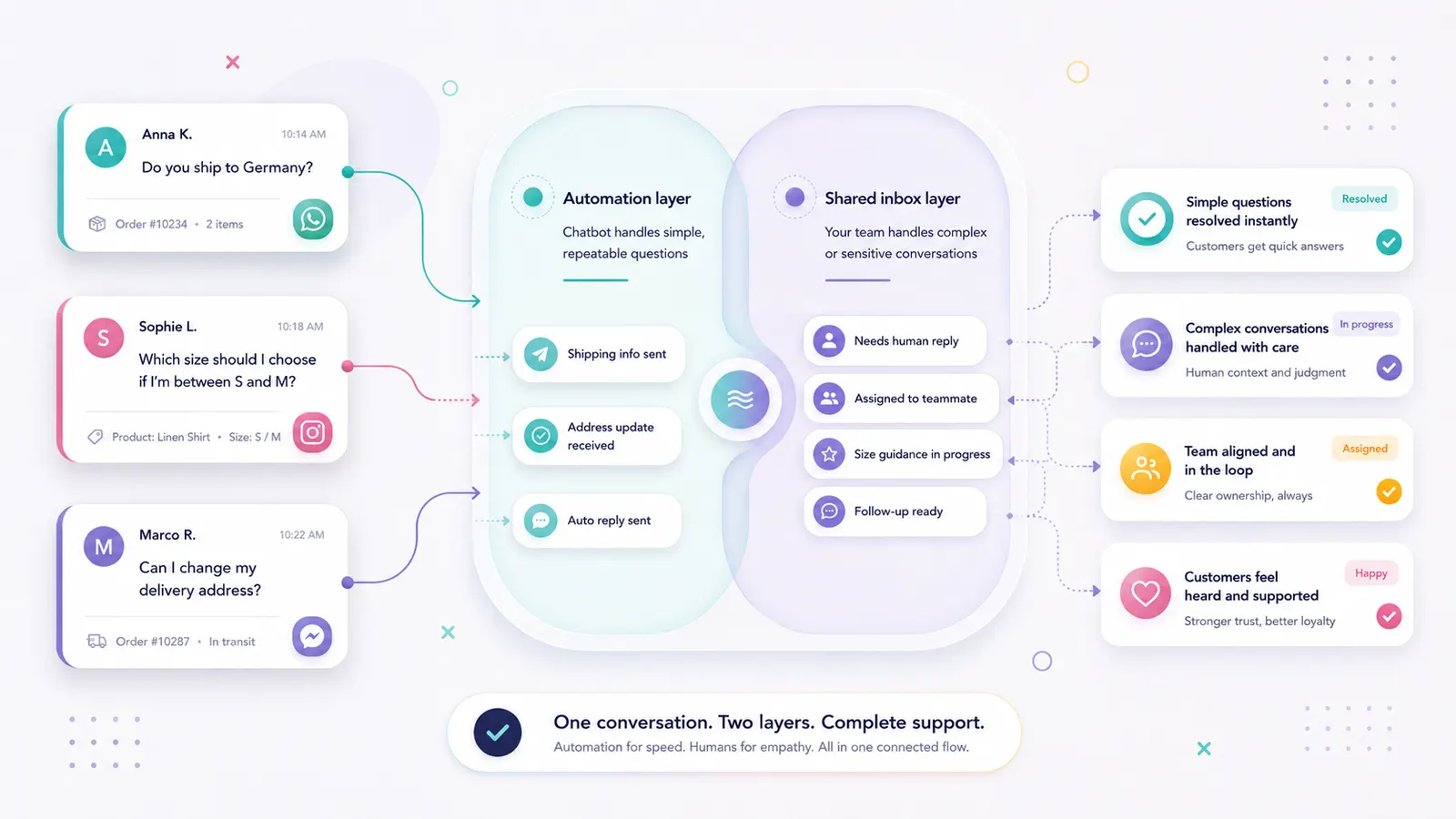
Shared inbox vs chatbot: what's the difference, and which one does your ecommerce team need?
In this article · 10 sections
Updated August 2026 to include SMS support through Twilio, current AI service agent context, and new examples for ecommerce teams.
What is the difference between a shared inbox and a chatbot?
A shared inbox is a collaborative workspace where your team manages customer conversations from WhatsApp, Instagram, SMS, and Messenger in one place. A chatbot is automated software that replies to customers without a person composing each message. They solve different problems: the inbox addresses how your team manages conversations; the chatbot addresses how quickly those conversations are answered. Most growing ecommerce teams eventually need both: one shared place for visibility and human handoff, plus automation for repetitive questions, first replies, and follow-ups.
- A shared inbox solves a coordination problem: it gives your team one place to manage, assign, and track conversations across channels.
- A chatbot solves a capacity problem: it answers repetitive questions automatically, without your team typing the same reply dozens of times a day.
- A shared inbox can also support SMS conversations when SMS is connected through a provider such as Twilio, so text-message replies don’t sit outside the rest of the customer journey.
- AI and chatbot transparency matter more than ever. Salesforce’s State of the AI Connected Customer reports that 72% of customers say it’s important to know if they’re communicating with an AI agent.
- 73.3% of consumers prefer messaging to contact a business (Meta/Kantar). 90% says a quick response is critical (Hubspot Research via Fluent Support, 2025). Both tools help you meet those expectations.
- The most common mistake is choosing one and ignoring the other. A chatbot without a shared inbox creates automated chaos. A shared inbox without a chatbot keeps the team permanently busy.
- Flownally combines both: a shared inbox with automation flows built in, for teams managing WhatsApp, Instagram, Messenger, and SMS conversations from one place.
Your customers do not care what tools you use. They care how fast you answer and whether the answer is helpful.
But behind the scenes, two very different problems can look identical.
Your team is missing messages, replying twice to the same customer, and losing track of who handled what. Or your team is answering the same questions all day, falling behind after hours, and running out of time before the list of conversations gets shorter.
Both create slow, inconsistent service. But they need different fixes.
A chatbot won't solve the first problem. A shared inbox won't solve the second.
Understanding which problem you actually have, and when you need to solve both at the same time, is where to start.
What is a shared inbox?
A shared inbox is a workspace where multiple people on your team can manage customer conversations together.
Instead of messages living in separate apps, your team sees everything in one view: what came in, who is handling it, what was said, and what still needs attention.
For e-commerce brands, this typically means bringing together conversations from WhatsApp, Instagram Direct, and Messenger, the three channels where most buying conversations happen today.
A shared inbox helps your team:
- see all open conversations in one place
- assign conversations to the right person
- avoid duplicate replies
- access the full conversation history, regardless of channel
- track what still needs a response
- manage SMS replies next to social messaging conversations
It doesn't reduce the number of messages your team receives. It makes the team more effective at handling them.
If you're not sure whether a shared inbox is the right next step, read our guide on how to manage WhatsApp, Instagram, Messenger, and SMS messages in one place.
What is a chatbot?
A chatbot is an automation that replies to customers without a person typing each message.
It can answer a question, collect information, route a conversation, or guide a customer through a flow automatically.
In e-commerce, chatbots are most useful for:
- answering questions about shipping, delivery times, and return policies
- sharing order status or restocking information
- collecting a customer's size or preferences before handing off to a person
- responding after business hours when the team is offline
- recognizing when a question needs a human and passing it on
- starting a simple product recommendation flow,
- triggering a reorder reminder or post-purchase follow-up.
The benefit is speed. A chatbot answers immediately, at any time of day.
The risk is experience. According to Salesforce's State of Service research (6th edition), 72% of customers won't use a chatbot again after a single bad experience. A bot that traps customers in rigid loops, or doesn't know when to hand over to a person, creates friction instead of help.
That is why automation shouldn't be treated as a standalone fix. It should sit inside a system where the team can see what happened, take over when needed, and continue the conversation without asking the customer to repeat themselves.
If you want to go deeper into tone and flow design, read our guide on how to automate customer replies without sounding like a robot.
Shared inbox vs chatbot: side-by-side comparison
| Shared Inbox | Chatbot | Shared Inbox + Automation | |
|---|---|---|---|
| Primary job | Organize team communication | Automate repetitive replies | Scale communication without chaos |
| Who handles messages | Human teammates | Automated system | Both, in sequence |
| Best for | Visibility, coordination, complex replies | FAQs, after-hours, fast responses | Growing teams across multiple channels |
| Main limitation | Doesn't reduce manual volume on its own | Can't handle nuance or high-intent moments | Requires thoughtful setup |
| Ecommerce use case | Managing DMs across Instagram, WhatsApp, Messenger | Answering order/shipping questions instantly | Chatbot handles FAQs; human closes the sale |
| Risk if misused | Organized chaos without speed | Speed without context or relationship | Overly automated; customer feels processed |
Four differences worth understanding
1. Purpose
A shared inbox is about organization. A chatbot is about automation. One helps your team work better together. The other handles work so your team doesn't have to.
For ecommerce brands, this distinction matters because message volume often grows before the team is ready for it. A shared inbox gives control. A chatbot gives speed. Together, they help the team stay responsive without losing the human side of the conversation.
2. Who handles the conversation
In a shared inbox, your team still writes the replies, but from one place, with full context on every customer.
In a chatbot flow, software replies automatically. A person steps in only when the conversation needs one.
The best setup makes that transition clear. Automation can collect basic context first. Then a team member can continue from the same thread, with the previous messages visible.
3. What each one fixes
If your team is saying: "Who is handling this?" or "I didn't see that message" or "Did anyone follow up?", that's a shared inbox problem.
If your team is saying: "We answer the same question twenty times a day" or "Customers message us at midnight and we can't respond until morning", that's a chatbot problem.
If your team is saying: “Customers ask buying questions in DMs, but we don't know how many sales we lose there,” that is a conversational commerce problem.
It usually needs both: one inbox for visibility, automation for predictable steps, and follow-up logic for sales moments that shouldn't disappear.
4. What happens without the other
A chatbot without a shared inbox creates partial automation. Common questions get answered instantly, but when a conversation needs a human, it lands back in a different app, without context for what the bot already said.
A shared inbox without a chatbot is organized but slow. The team has one view of everything, but they're still typing every reply manually. As message volume grows, so does the workload.
That is why shared inbox vs chatbot is the wrong long-term question for growing ecommerce teams. The better question is: how do we combine both without making customers feel processed?
Where does SMS fit in a shared inbox vs chatbot setup?
SMS is a messaging channel. It’s not a chatbot or a shared inbox. That means SMS can be handled manually, automated, or managed inside a shared inbox, depending on your setup.
For ecommerce brands, SMS can be useful for short updates, delivery questions, appointment reminders, reorder reminders, and direct customer replies. But SMS can also create another layer of chaos if it sits in a separate tool.
A customer might ask about a product on Instagram, confirm delivery details on WhatsApp, and reply to an SMS update with a question. If those messages are separated, the team loses context.
A shared inbox helps bring those conversations into one workflow. A chatbot or automation flow can handle predictable SMS replies. A team member can step in when the customer asks something specific.
That is the value: not SMS by itself, but SMS connected to the rest of the customer conversation.
Why most growing ecommerce teams need both
The two tools don't compete. They work on different layers of the same conversation.
A chatbot handles the first layer: instant answers to predictable questions. A shared inbox handles the second layer: the conversations that need judgment, context, and a real person.
That hybrid approach is quickly becoming the standard. According to Gartner, 85% of customer service leaders were expected to explore or pilot customer-facing conversational AI in 2025, not to replace support teams, but to help them respond faster and scale more effectively.
The strongest ecommerce support setups reflect exactly that: AI handles repetitive requests and first-response coverage, while human agents step in when empathy, flexibility, or problem-solving matter most.
Here's what it looks like in practice:
A customer messages on Instagram: "Do you ship to Germany, and how long does it take?" The chatbot responds immediately based on your delivery rules.
The same customer follows up: "I'm between two sizes. Which would you recommend?" The chatbot recognizes this needs a person and passes it on, with the full conversation history visible.
The teammate answers with context. The customer doesn't have to repeat themselves. For ecommerce teams, that context matters because many conversations are not just support requests. They are buying moments.
That's the setup worth building toward: not the fastest possible bot OR the most organized inbox, but the right combination of both.
Flownally is built around this idea. It combines a shared inbox with automation flows for WhatsApp, Instagram, Messenger, and SMS, so your team can manage customer conversations from one place and automate predictable steps without removing the human side of the relationship. To go deeper, read our guide on how to manage WhatsApp, Instagram, and Messenger messages in one place.
How to know which problem you have
Start with a shared inbox if your team is saying:
- "I didn't see that message."
- "Who is replying to this customer?"
- "Did anyone follow up?"
- "I replied, but someone else already had."
- "That SMS reply is in another tool."
- "We don't know which DMs still need a response."
Add a chatbot when your team is saying:
- "We answer the same questions every day."
- "People message us after hours and we can't get back to them fast enough."
- "We lose sales because we reply too slowly."
- "We need instant first replies, but we don't want every conversation to feel automated."
- "Our team should focus on messages that need judgment, not repeat the same answers all day."
Use both when your business is growing, message volume is increasing, and you need the team focused on conversations that actually need human attention.
In high-intent messaging conversations, faster replies can protect sales that would otherwise go cold. At scale, the only way to consistently be that vendor is to automate what can be automated, and have your team ready for what can't.
- Use a shared inbox when your team is missing messages, replying twice, or losing context across channels.
- Use a chatbot when your team answers the same questions repeatedly or needs instant replies after hours.
- Use both when message volume is growing and you need faster replies without losing human control.
How Flownally combines shared inbox and automation
Flownally helps ecommerce teams manage and automate customer conversations across WhatsApp, Instagram, Messenger, and SMS.
It's not only a chatbot or an inbox. It combines both layers: one shared workspace for the team, and automation for predictable parts of the conversation.
With Flownally, ecommerce teams can:
- manage WhatsApp, Instagram, Messenger, and SMS conversations in one place,
- automate repetitive questions and routine steps,
- keep conversation history visible before a person replies,
- hand off conversations when the customer needs advice or a custom answer,
- create follow-ups for moments such as abandoned carts, product recommendations, reorder reminders, and reactivation,
- reduce missed buying signals across DMs and text messages.
The goal is to make customer conversations clearer, faster, and easier to continue.
Ready to check if a shared inbox is a good fit for your business?
See how Flownally helps your team get fewer missed questions, faster replies, and a calmer way to turn customer conversations into sales.



FAQ
No. A shared inbox helps your team manage customer conversations from multiple channels in one place. A chatbot automates selected replies and flows without requiring a person to type each message. They solve different problems and work best when used together.
A shared inbox is about coordination: one place for your team to manage, assign, and track all customer conversations. A chatbot is about automation: instant answers to predictable questions, handled without manual input. One helps your team work better; the other helps you handle more, faster.
You may. A shared inbox organizes your team's workload but doesn't reduce the volume. If your team spends significant time answering the same questions, a chatbot can take over the repetitive part, leaving the team to focus on conversations that need real input.
Yes, in most cases. A chatbot handles automation, but someone still needs to manage the conversations it can't resolve. Without a shared inbox, those conversations land back in separate apps, and your team loses context, ownership, and visibility.
For most growing ecommerce brands, the answer is both: automation for common questions and a shared inbox for everything else.
Platforms like Flownally combine the two so your team can manage WhatsApp, Instagram, Messenger, and SMS from one place, with automation built in.
Not if the flows are written with care. Automation should sound clear, natural, and consistent with your brand. The goal is not to process customers, it's to help them faster, in a way that still feels like your brand.
For practical examples, read our guide on how to automate customer replies without sounding like a robot.
A handoff happens when automation reaches the limit of what it can handle and passes the conversation to a person on your team. A good handoff keeps the full conversation history visible so the agent can continue without asking the customer to start over. In Flownally, this can happen inside the same shared inbox, so the transition is clear for the team and smoother for the customer.
This depends on the platform. Flownally supports WhatsApp Business, Instagram, Messenger, and SMS. SMS can be supported through Twilio, so text-message replies don't need to sit outside the rest of the customer conversation.
SMS is a messaging channel. It can be managed inside a shared inbox and supported by automation, but SMS itself is not the same as a chatbot. For ecommerce teams, SMS works best when it is connected to the rest of the customer conversation, not managed as a separate tool.
Yes. A shared inbox helps ecommerce teams manage buying conversations across channels.
When customers ask about products, sizing, delivery, payment, returns, or reorders, those messages can influence sales.
A shared inbox keeps those conversations visible, while automation helps handle predictable steps.
Usually not. A chatbot can answer simple questions and collect context, but conversational commerce also needs human handoff, conversation history, follow-up logic, and one place for the team to manage open conversations.
That is why most growing ecommerce teams need both a shared inbox and automation.
Ecommerce brands should use both when message volume is growing, customers ask repetitive questions, and some conversations still need a person.
For example, automation can answer delivery questions, collect size preferences, or start an abandoned cart follow-up. A team member can step in when the customer needs advice, order changes, or help with a high-value purchase.