 Aleksandra Koszela, Product & CX Strategist at Flownally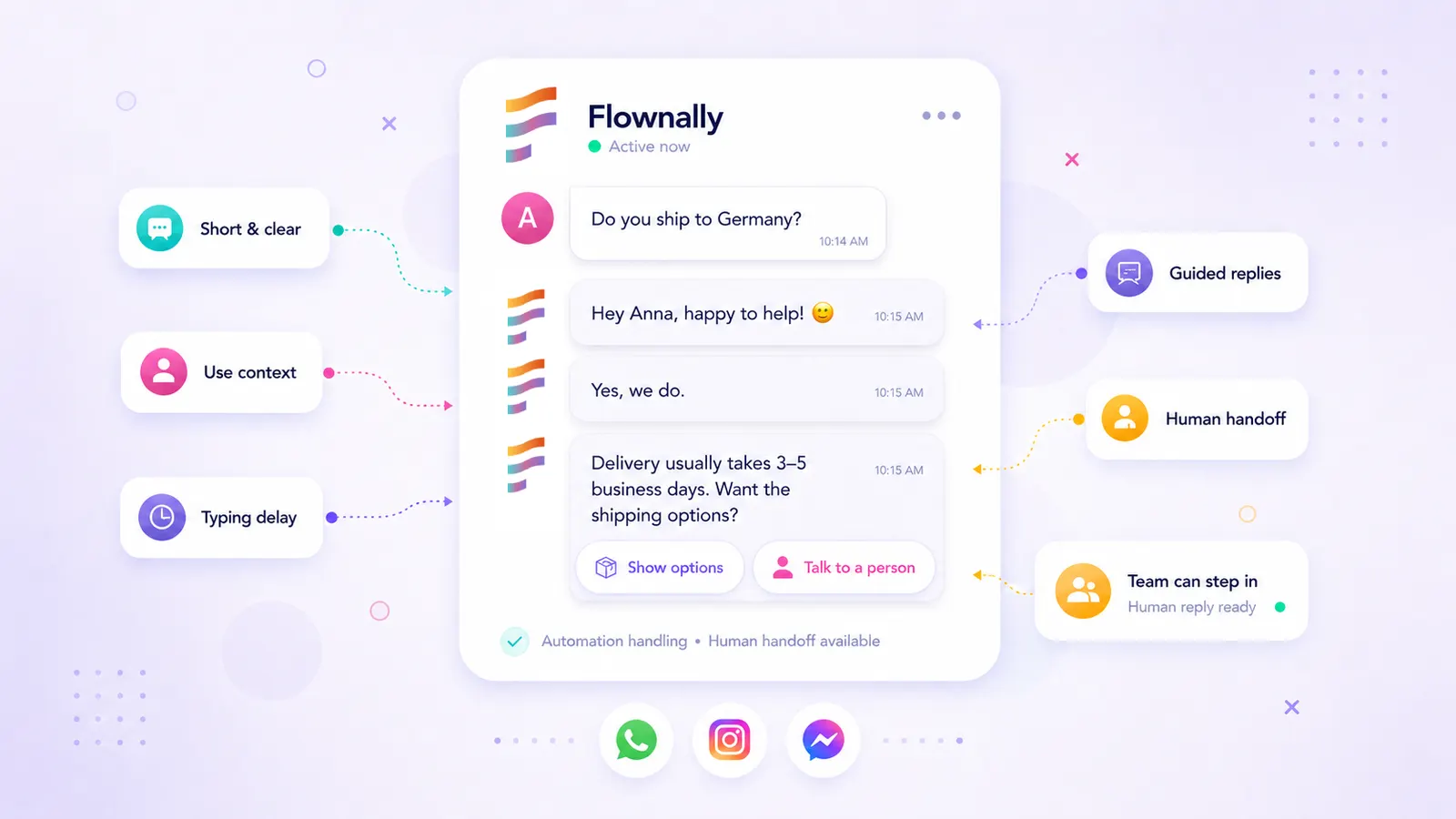
How can I automate customer replies without sounding like a robot?
In this article · 12 sections
You can automate customer replies without sounding like a robot by writing messages the way people actually text: short, direct, one idea at a time, and easy to respond to. Good automation should not pretend to be human. It should feel human to interact with.
- Most automated messages fail because they are written like corporate emails, not conversations. Messaging channels are the wrong place for that format.
- Five fixes help most: write like a text, use real context, split messages into natural steps, add a short typing delay, and always build in a path to a real person.
- Chatbot replies and WhatsApp template messages are both automation. Both need clarity, brevity, and a natural next step.
- Flownally helps ecommerce teams run these flows across WhatsApp, Instagram, and Messenger from one shared inbox where automation and your team work together.
A customer messages your Instagram page about sizing. Your bot replies in 0.3 seconds:
Dear customer, thank you for contacting our support department. We have received your message and will respond shortly.
They close the chat. You lost the sale.
It was not the speed that failed them. It was the tone.
Automation that sounds like a form letter signals one thing: we are not really here. Even if the intent is helpful, the experience is cold.
The good news: this is entirely fixable, and it does not require rebuilding your flows from scratch. It requires rewriting them.
What counts as automation?
For this article, automation means any message your customer receives without a person typing it in real time.
That includes:
- chatbot replies inside a conversation
- WhatsApp template messages
- order updates
- abandoned cart follow-ups
- post-purchase journeys
- return or delivery status messages
Some automation happens after the customer starts a conversation. Some is sent proactively, like a WhatsApp template message after a purchase or a cart abandonment. Both need the same thing: a message that feels natural, useful, and respectful of the customer's attention.
In Flownally, chatbot replies and WhatsApp template messages can be part of the same customer journey. That matters because automation should not sit separately from the rest of the conversation. It should work with the full customer context.
Why automated messages often sound robotic
Most bad automation has the same problems: too long, too formal, too much information at once, no clear next step. Or worst of all: the customer is trapped in a loop with no way to reach a real person.
That is when customers feel processed instead of helped.
The issue is rarely automation itself. It is automation written like a system notification instead of a conversation. A customer messaging on WhatsApp or Instagram is in a chat, not reading an email newsletter. They expect the rhythm and length of a chat.
Write like a text, not an email
The fastest way to make automation feel human is to stop writing it like a corporate email.
| ❌ Robotic | ✅ Human |
|---|---|
| Dear customer, thank you for contacting our support department. Polite, but it does not feel like a real conversation. | Hey Anna - happy to help. What are you looking for today? |
This does not mean your brand needs to sound casual if that is not your style. A luxury brand, a skincare brand, and a home decor store will not write in the same voice. But all of them can sound human.
A good test: read the message out loud. If no one would type this in a real conversation, rewrite it.
Use contractions where they feel natural. Say "we'll" instead of "we will." Say "you're all set" instead of "your request has been successfully processed." Keep one idea per message.
A good automated message should feel easy to read in two seconds.
Use context, not just personalization
Personalization is not only about inserting the customer's first name. Context is more powerful.
| ❌ Robotic | ✅ Human |
|---|---|
| Hello {{name}}, your order {{order_no}} has been shipped. Track it here: {{link}}. | Good news, {{name}} - your order {{order_no}} is on its way. Follow it here: {{link}}. |
The data is identical, but the second version sounds like something a person would actually send.
For ecommerce teams using WhatsApp templates, dynamic variables are where personality lives: product name, order number, the item the customer asked about. Use enough context to be helpful, but do not overdo it to the point that the customer feels tracked.
So if you are thinking about writing a message like this:
Hey {{first_name}}, your {{product_name}} from the {{collection_name}} in {{color}} is now moving through our {{carrier_name}} journey.
Do not do it. Sometimes less is more.
Avoid text walls
A three-paragraph automated reply almost always feels automated. In messaging, length creates friction.
Instead of:
Thank you for your message. We would be happy to assist with sizing. Please share your measurements, preferred fit, and the product you're interested in.
Try:
Happy to help with sizing.
Which fit do you prefer?
- Relaxed
- True to size
- More fitted
This feels lighter and gives the customer an easy next step.
Buttons are especially useful when the customer does not need to type a custom answer. They reduce effort and keep the flow moving.
Use buttons for order status, sizing help, return steps, delivery questions, discount opt-ins, and reaching a human. The point is not to remove choice, but to make the next step obvious.
Add a natural rhythm
Instant replies are useful. But if a customer sends a message and receives a long, polished reply in half a second, the illusion of a conversation breaks.
Most platforms let you add a short typing delay. Use it: 2-3 seconds before short replies, 4-5 seconds before longer messages. The customer sees the typing indicator and waits a second for an answer, exactly as they would with a real person. It does not feel like a waste of time. It feels like being helped.
A good rhythm might look like this:
Do you ship to Germany?
Yes, we do.
Delivery usually takes 3-5 business days. Want the full shipping options?
- Show options
- Talk to a person
The customer gets a clear answer first, then the next step. That is better than one dense block.
Know when automation should stop
Automation should not try to handle every conversation. Some moments need a person.
Hand off when:
- the customer is frustrated or angry
- the question is unclear or involves multiple issues
- the customer is close to buying and needs reassurance
- the automation does not understand the message
| ❌ Bad handoff | ✅ Better handoff |
|---|---|
| I did not understand your request. Please try again. This message is of no value and causes customer frustration. | I want to make sure we get this right. I'll pass this to our team, and someone will reply here shortly. This message is calm, honest, and useful. |
You do not need to pretend the automation is a person. You just need to make the next step clear.
In Flownally, when a conversation is handed off, the team member sees the full message history: what the automation said and what the customer asked. They can pick up without asking the customer to start over. That seamlessness protects both the customer experience and the sale. If you are managing these conversations across multiple channels, read our guide to managing WhatsApp, Instagram, and Messenger messages from one shared inbox.
Before and after: two common scenarios
Abandoned cart follow-up
| ❌ Robotic | ✅ Human |
|---|---|
| Hello {{name}}. You left products in your cart. Complete your purchase now using code SAVE10 before the offer expires. | Hey {{name}}, your cart is still here. Want 10% off to finish your order? [Claim 10% off] [Ask a question] [Not now] |
The better version is shorter and less pushy. It gives the customer three natural paths: buy, ask, or decline.
That is what good automation does. It does not force the customer down one path. It helps them move forward.
Product question
| ❌ Robotic | ✅ Human |
|---|---|
| Thank you for your inquiry. Please provide the product SKU so we can verify availability in our inventory system. | Sure - I can check that. Which product are you looking at? [Send product] [Browse bestsellers] [Talk to us] |
Again, the better version does not sound like a machine. It sounds like a helpful store assistant.
Real results: how humanized messaging performs
90% of customers rate an immediate response as important or very important, but 72% will not use a chatbot again after a single bad experience (HubSpot; Salesforce, State of Service). The gap between those two numbers is where good automation design matters: speed, tone, context, and a clear path to a human.
Nordic skincare brand Vessi used WhatsApp Flows together with marketing, utility, and service messages to manage the customer journey. According to WhatsApp for Business, Vessi saw a 37% decrease in cost per conversation and a 41% increase in messages per lead compared with its usual approach.
Benefit Cosmetics also used WhatsApp Business Platform to support self-service appointment changes, reminders, FAQs, and customer outreach. The company reported a 30% increase in brow and lip wax bookings attributable to WhatsApp and a 60% faster agent response time with WhatsApp compared with email.
When automation is useful, timely, and easy to respond to, it reduces manual work and creates a better experience. When it sounds cold or confusing, it creates more work.
7 questions to ask before publishing any automated message
Use this checklist before publishing any automated message:
- Is the message short enough for a chat?
- Does it answer the customer's actual question?
- Does it use context in a helpful way?
- Is there one clear next step?
- Can the customer reach a human if needed?
- Does the message sound like your brand?
- Would you send this manually to a real customer?
If the answer is yes, your automation is probably in good shape. If not, simplify it.
Automate replies without losing the human touch
Flownally helps ecommerce teams automate and manage customer conversations across WhatsApp, Instagram, and Messenger from one inbox.
That means automation does not sit separately from the rest of the conversation. Your team can create flows for common questions, build chatbots, send WhatsApp template messages, manage replies, and step in when a customer needs a human answer, with full conversation history visible throughout.
Automation handles the predictable parts. Your team keeps control of the relationship.
Finally, everything flows.
Ready to see how Flownally helps your team reply faster, keep context, and hand off conversations when a human is needed?



FAQ
Make them short, specific, and conversational. Use the customer's context, avoid formal email language, and give one clear next step. Add a human handoff when the automation cannot help.
Only if they fit your brand. One emoji can make a message feel warmer. Too many can make it feel unserious. Use them with intention, not as decoration.
Yes. WhatsApp template messages are automation when sent as part of a customer journey: order updates, abandoned cart follow-ups, reminders, or marketing opt-ins.
The biggest mistake is trying to automate everything. Automation should handle predictable questions and simple steps. Complex, emotional, or high-intent conversations should move to a real person.
Most automated replies should be one to three short sentences. If you need more information, split it into smaller messages or use buttons, quick-reply lists, carousels, or forms.
When it does not understand the message, when the customer asks for personal advice, when there is frustration, or when the conversation could affect a sale or a relationship.
A typing delay is a short pause before the bot sends a reply, during which the customer sees a "typing..." indicator, just as they would with a real person. A 2-5 second delay makes the interaction feel like a conversation rather than a machine response.
A hybrid handoff is the moment when an automated flow passes a conversation to a human team member. A good handoff keeps the full conversation history visible so the agent can continue without asking the customer to repeat themselves.
Yes, if it is impersonal, slow to recognize frustration, or offers no path to a person. Automation that feels like a wall, not a bridge, damages trust. The fix is designing flows that stay helpful and always offer a way out.
Conversational automation is messaging that handles the predictable parts of a conversation: FAQs, order updates, product guidance, while maintaining a tone and structure that feels like a real exchange. It responds to what the customer said, not just what you planned to say.
Read every message out loud. If it sounds like something no person would type in a real chat, rewrite it. Then send the full flow to a colleague without telling them it is automated. If they can tell immediately, the copy needs work.